Source: RAWG
Page Summary

Best High FPS PC for Half-Life 2: Deathmatch

This high FPS PC for Half-Life 2: Deathmatch pairs a fast Ryzen 5 9600X with an RTX 5060 to deliver the consistent high frame rates and low system latency that make bunnyhopping, strafe-jumping, and physics-prop combat feel immediate and precise. The build prioritizes strong single-thread CPU performance and modern platform responsiveness over unnecessary graphics power because the Source engine in deathmatch is far more sensitive to processor speed and input consistency than to visual detail. At typical low player counts this configuration keeps frame delivery steady even during chaotic explosion and object spam moments.

Recommended Build: High FPS Deathmatch Build
Estimated Budget: $1,300.00
About this scenario

What matters for Half-Life 2: Deathmatch (High FPS / Competitive)

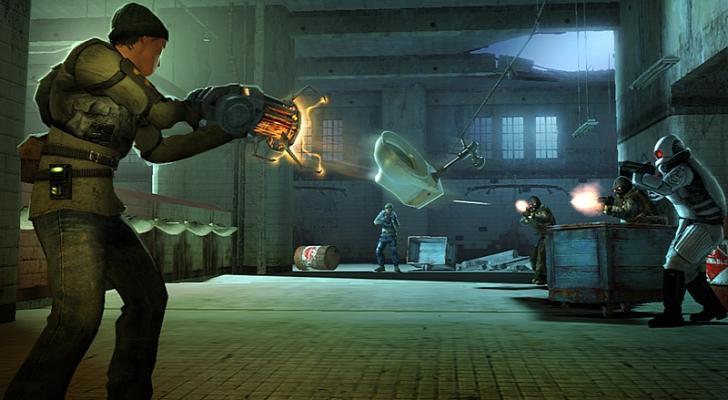
Half-Life 2: Deathmatch is a fast-paced arena multiplayer shooter built on the Source engine where players battle using gravity gun, crossbow, and improvised physics objects such as barrels, saw blades, and toilets. Matches consist of short rounds on small maps with instant respawn, weapon pickups, and constant movement. Most players jump into casual deathmatch or team deathmatch on community servers that rarely exceed eight to twelve participants, chasing high killstreaks while pulling off movement tricks like bunnyhopping and precise prop throws. In the high FPS scenario, the emphasis shifts from visuals to responsiveness. Every mouse flick and jump must feel instantaneous, which requires the game to maintain high frame rates so the physics engine updates quickly and input feels direct. Player count, explosions, and multiple simultaneous physics objects create brief spikes in CPU load that can cause micro-stutter on slower processors even though the overall hardware demand is low. Common pain points include inconsistent frame delivery during prop spam or when multiple grenades detonate at once, which throws off aim and movement timing. Older or poorly configured systems often feel sluggish despite the game's age because the single-threaded portions of the engine still need fast clock speeds to keep simulation and rendering in sync. Before choosing a PC for this style of play, understand that visual settings matter very little. The game looks essentially the same at high or low settings on modern hardware, so money spent on high-end graphics capability brings almost no benefit in vanilla deathmatch. Instead, focus on a CPU that can sustain high frame rates, low-latency RAM, and a platform that minimizes overall system overhead so your monitor's high refresh rate stays fully utilized.
Performance priority
High Frame Consistency and Low Input Latency
Component focus
The CPU is the most important part for this scenario because Half-Life 2: Deathmatch relies on rapid physics calculations and simulation updates that benefit from high clock speeds and strong single-core performance.
Recommended build

High FPS Deathmatch Build

CPU
AMD Ryzen 5 9600X 6-Core 12-Thread 3.9GHz AM5 65W CPU
GPU
ZOTAC Gaming RTX 5060 8GB GDDR7 OC
Cooler
Thermalright Peerless Assassin 120 SE ARGB CPU Air Cooler
Motherboard
ASUS Prime B650-PLUS WIFI Motherboard
RAM
Patriot Viper Elite 5 16GB DDR5-6000 RAM Kit
Storage
Kingston NV3 1TB M.2 2280 PCIe SSD
Case
Montech AIR 903 BASE E-ATX Mid Tower Case High Airflow
PSU
MSI MAG A650BN 650W 80+ Bronze ATX 3.1 PCIe 5.1 PSU
Why we chose it

Why this build makes sense

This build is engineered for maximum responsiveness in Half-Life 2: Deathmatch rather than visual fidelity. By selecting a modern AM5 platform with the Ryzen 5 9600X, it delivers the high single-thread performance the Source engine needs to keep physics simulations and input polling rapid even during the busiest fights. The system accepts a modest overall budget by avoiding graphics cards larger than necessary, recognizing that Deathmatch rarely stresses the GPU beyond basic duties. The Ryzen 5 9600X paired with the RTX 5060 8GB creates a sensible balance. The CPU handles the majority of the work—feeding simulation data quickly and keeping frame times tight—while the GPU easily manages the modest rendering load at 1080p so it never becomes the limiter. This prevents the CPU from waiting on the graphics card and ensures steady frame delivery to high-refresh monitors. The 16GB DDR5-6000 memory further supports low-latency operation, and the fast 1TB NV3 SSD reduces any storage-related hitches when loading maps or textures. Component choices throughout avoid mismatched priorities. The B650 motherboard and Thermalright Peerless Assassin cooler support sustained CPU boost clocks without thermal throttling, the 650W PSU provides clean power with headroom, and the airflow-focused Montech case keeps temperatures low. The result is a system that feels quick and reliable for nostalgic competitive-style play without wasting money on graphics performance the game cannot use.

Not sure if this build is right for you?

Every gamer is unique. Stop guessing and let our smart engine build a custom rig tailored exactly to your budget and the games you actually play.

Take the PCBuildQuiz!

A Note on Market Volatility

Our mission at PCBuildQuiz is to help you get maximum performance for every dollar by scanning for the best new retail prices 24/7. However, the hardware market can be unpredictable, and specific components like RAM or GPUs may experience temporary price spikes due to shortages. If a price seems unusually high, we recommend checking reputable used marketplaces or waiting for the volatility to settle because we would rather you save money than overpay for a brand new box.

Affiliate Disclaimer

Transparency is key. Some links on this page are affiliate links. This means if you click through and make a purchase, we may earn a small commission at no extra cost to you. This supports our servers and keeps our build engine free for everyone.